
| |
EDI Viewer - AC1 Reporte EUB Facility |
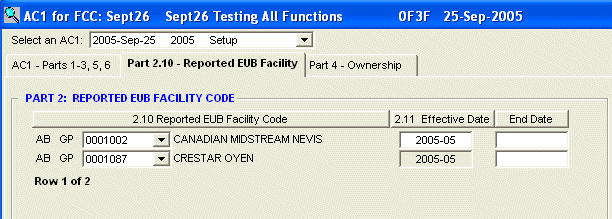
The AC1 Reported Facility tab is used to edit and enter AC1 Reported Facility for facility cost centers.
The Select an AC1: list box at the top of the window lists the date prepared and type for all AC1 forms for this FCC. Picking a selection from this list box will show you that AC1's Reported Facility. This allows you to see a complete audit trail of AC1 Reported Facilities.
Picking an AC1 from the list that is not the most recent AC1, will put that AC1 form into a Read Only status. Since there is a newer AC1, all previous AC1s cannot be editted preserving your audit trail, but still allowing you to view and print them.
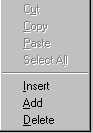
To add or insert new AC1 Reported Facilities, you can
do any one of the following:
To delete AC1 Reported Facilities, click on the row you want to delete and do any one of the following:
|
 |
| To Print an AC1 form, click the Print toolbar button or choose Print from the File menu. |
Columns on the window are:
| Effective Date | The date the FCC Reported Facilities for this
Client ID became effective. You must enter a full date, including the day. Any day can be entered, because the system uses year-month for calculations and only displays the year-month, but entering the day helps to keep the system Year 2000 compatible and allows for future changes. The date format you have to enter depends on the date format your computer has been set to.
|
| End Date | The date this Reported Facility was un-linked from this FCC. This date is used in creating the AC1 electronic file to indicate that this facility should be unlinked from the FCC. The date format you have to enter depends on the date format your computer has been set to.
|
| Reported EUB Facility Code | The EUB Facility code linked to this FCC.
From the list box, you can pick owners 2 ways.
|