
| |
EDI Viewer - AC2 Rollforward / Batch Amendments |
EDI Viewer can create AC2 forms for a production year by using the data from the previous year. The steps are:
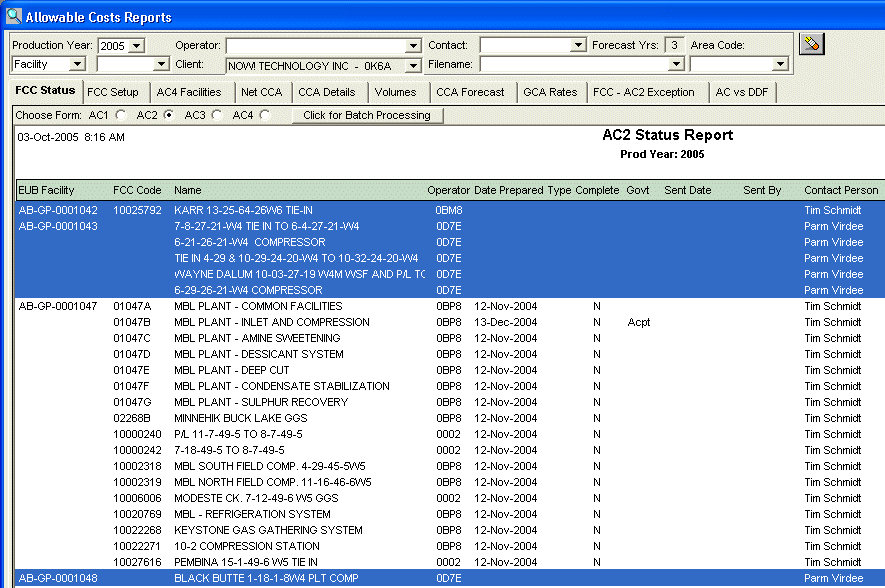
Once you have the FCCs highlited, click the Click for Batch Processing button and you will see the AC Forms Batch Process window below.
Look at the Rollforward AC2's section in the middle of this window and check Create AC2 Forms.
You also have 3 additional options to choose. They are:
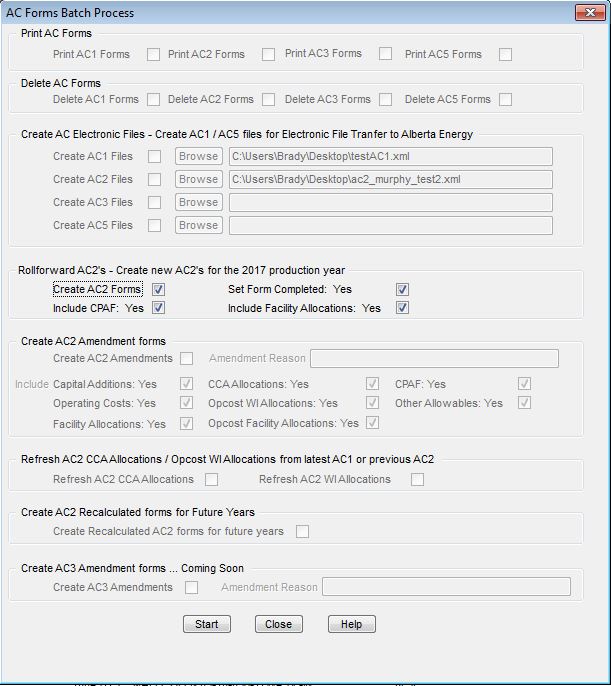
Click Start to create AC2 forms.
When this process has finished, you will see a message. Click the Close button.
If you click the Retrieve button, you should now see today's date in the Date Prepared column on the AC2 FCC Status report for all FCCs you highlited.
Business Rules:
EDI Viewer can also use this process to create batch AC2 amendments:
Follow the same steps as above to highlite FCC's with a date prepared. If there is no Date Prepared, and AC2 Amendment will not be created.
Once you have the FCCs highlited, click the Click for Batch Processing button and you will see the AC Forms Batch Process window below.
Look at the Create AC2 Amendment Forms section in the middle of this window and check Create AC2 Amendments.
You also have several additional options:
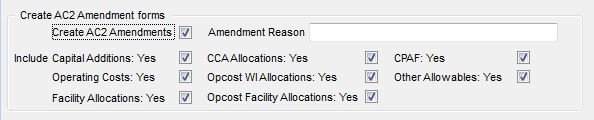
Click Start to create AC2 forms.
When this process has finished, you will see a message. Click the Close button.
You can access the created AC2 Amendments through the FCC Explorer.
EDI Viewer can also use this process to Refresh AC2 CCA Allocations:
In some situations, when uploading CCA throughout the year, you may come across situations where a Change AC1 is filed and the Current CCA Allocations on your AC2 form are no longer correct. In this scenario, you will want to use the Refresh AC2 CCA Allocations tool.
Follow the same steps as above to highlite FCC's with a date prepared. If there is no Date Prepared, and AC2 Amendment will not be created.
Once you have the FCCs highlited, click the Click for Batch Processing button and you will see the AC Forms Batch Process window below.
Click the check-box in the Refresh AC2 CCA WI% Allocations section. You also have the option to refresh OpCost wI% Allocations:

Click Start to create AC2 forms.
When this process has finished, you will see a message. Click the Close button.