
| |
EDI Viewer - Contact Person |
The Contact Person window is used to edit and enter contact persons used in the Allowable Costs module.Contact persons are used on all AC forms and can be used to assign FCC responsibility to different contact persons. You can also run reports by contact person.
The contacts will be sorted by Last Name and First Name, but you can sort by any column by clicking on the heading of that column. For example, to sort by active column, click the Active heading button. Clicking it more than once will sort the data in ascending or descending order.

Columns on the window are:
| Last Name | the last name of the contact person. |
| First Name | the first name of the contact person. |
| Active | Yes is this contact person is still active, and No if they are not active or have left your company. Using No keeps your original audit trail on AC forms. |
| Phone Number | the contact person's phone number. Used as the phone number printed on AC forms. When entering the phone number, key in only numbers including the area code and the system will format the phone number for you. |
| Fax Number | the contact person's fax number. This does not appear on any AC forms and is for information purposes only. When entering the fax number, key in only numbers including the area code and the system will format the fax number for you. |
| Title | the contact person's title. This is used for printing on AC5's at the title of the Corporate Signing officer. |
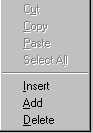
To add or insert a new contact person, you
can do any one of the following:
To delete a contact person, click on the row you want to delete and do any one of the following:
Note: You will not be able to delete a contact person once it has been attached to a facility cost center and that facility cost center has any AC forms entered for it. |
 |
| To Print a contact person report, click the Print toolbar button or choose Print from the File menu. | |
| To Export contact person data, click the Export toolbar button to save this data in another format. | |
| To Filter contact person data, click the Filter toolbar button to set a filter to see a specific group of contact persons. |