
| |
EDI Viewer - Facility Cost Center Setup |
The Facility Cost Center Setup window is used to edit and enter the facility cost center master files used in the Allowable Costs module. This window is used for populating the system with facility cost center data when first starting to use the Allowable Cost module, but should not be used on a regular basis. After setup, use the AC1-AC5 forms to update all facility cost center information.
Updating the FCC Code column (for new, previously blank FCCs) in this window will update the FCC Code column (section 2.3) of the Setup AC1 at the same time.
The FCCs will be sorted by FCC Code, but you can sort by any column by clicking on the heading of that column. For example, to sort by FCC Name, click the FCC Name heading button. Clicking it more than once will sort the data in ascending or descending order.
The tabs in the lower left portion of the window allow you to enter information for the high lighted Facility Cost Center:


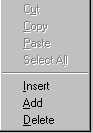
To add or insert a new Facility Cost center,
FCC Ownership Record, Cost Center, and Stream you can do
any one of the following:
To add a comment for a Facility Cost Center do the following:
To delete a Facility Cost Center, click on the row you want to delete and do any one of the following:
|
 |
To copy a Facility Cost Center to a new
facility cost center, do the following:
To copy Facility Cost Center ownership records to other facility cost centers, do the following:
|
|
| To Find a FCC, enter all or part of the FCC code in the text box next to the find button. Click find and the FCC will be highlighted by the red pointer. | |
| To Print a contact person report, click the Print toolbar button or choose Print from the File menu. | |
| To Export contact person data, click the Export toolbar button to save this data in another format. | |
| To Filter contact person data, click the Filter toolbar button to set a filter to see a specific group of contact persons. |