EDI Viewer - Partner Reporting


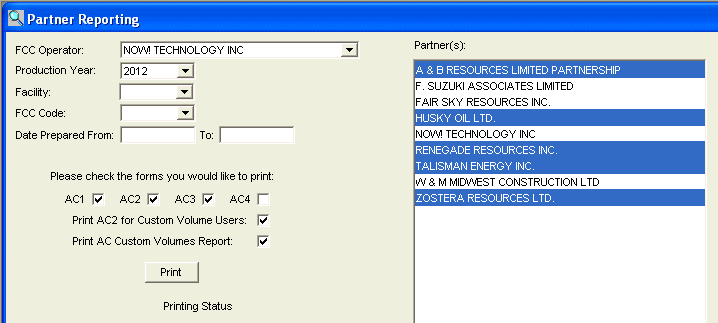
The Partner Reporting window is used to print all AC forms for any partners you choose.

Each partner's AC forms are started with a cover page with that partner's name on it so you can easily separate the reports when printing multiple partners at once.
To print Partner reports
  1. Choose which FCC Operator code you are printing AC forms from.
  2. Choose the Production Year to print reports for. This will populate the partners on the right side of the screen.
  3. Click to highlite one or more partners you want to print AC forms for.
  4. You can pick a specific Facility, FCC code, or a range of Dates Prepared to print AC forms from.
  5. Check the AC1, AC2, AC3, AC4 check boxes to indicate which forms you want printed.
  6. Click the Print button to start the printing process.