
| |
EDI Viewer - BC Petrinex Oil Cost Center Maintenance |
The BC Petrinex Oil Cost Center Maintenance window is used to create a cross reference to your financial system. The fields on the window may vary depending on which financial system you are using. All cost centers are linked to a company you have defined.
To see the wells and cost centers on this window, select a Company and click the Retrieve button on the toolbar.
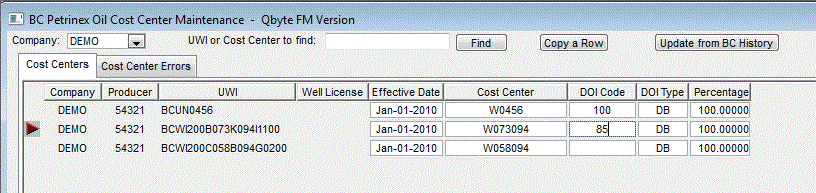
To find a UWI or Cost Center:
|
|
|
|
To enter or update Cost Center data:
You cannot add or delete rows here. These are UWI's that are linked to data that you have imported. Any time you import an file with new UWI's, they will automatically show up on this window. To Sort, click on the headings. To sort by UWI, click on the UWI heading and the wells will be sorted by UWI in ascending order. Clicking on the UWI again will sort the wells in descending order. This can be done for any column by clicking on the heading. Clicking on the Sort toolbar button gives you the option to sort by multiple columns at once. |
|
| To Print, click the Print toolbar button or choose Print from the File menu. |