To add a lessee, you can do any one of the following:
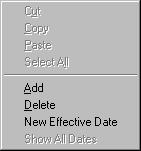
- Right-click your mouse to get a popup menu and choose add or insert.
- Press the shortcut keys, CRTL and A (add).
- Click the edit menu at the top of the screen and then choose add or insert.
To delete a lessee, click on the row and do any one of the following:
- Right-click your mouse to get a popup menu and choose delete.
- Press the shortcut keys, CRTL and D.
- Click the edit menu at the top of the screen and then choose delete.
To create a new effective date, click on the row and do the following:
- Right-click your mouse to get a popup menu and choose New Effective Date.
- Key in the new effective date. All dates must be in the current tax year.
- To see the lessees for all dates, right-click the mouse and choose Show All Dates.
- To see only the most current lessees, right-click the mouse and choose Show only Current Effective Date
Net Tax Calculation:
- The net tax will be calculated when you click the Save toolbar button or choose Save under the File menu.
- The net tax calculation is calculated as follows:
- The Rebill check box is should be checked if you want to produce a Rebill Invoice for this lessee. A Rebill Invoice is usually a second invoice to a lessee where there have been changes from the first invoice. The Rebill Invoice will show the entities that have been changed with 3 lines on the invoice, the original from the previous invoice, a reversal, and the new charge.
- The Billable check box should be checked if you want this detail printed on the lessees invoice and unchecked if you do not.
|
 |

