EDI Viewer - PT GL Company Maintenance


The GL Company Maintenance window is used to link GL company codes to imported Assessee ID / SIM codes. This window uses the GL File Format column to control the formatting of the GL Upload .txt file created in the GL Upload window.



To enter Company Codes, Company Names, and Assessee IDs:
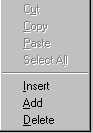
  1. To add or insert a new company, right-click your mouse to get a popup menu and choose add or insert. Type in the company code, name. Then from the drop down list choose the associated assesssee ID / SIM code.
  2. To delete a company, click on the row you want to delete, right-click your mouse to get a popup menu and choose delete. 
  3. Click the Save button on the toolbar to save your changes.

 
To Sort, click on the headings. To sort by Company Code, click on the Company Code heading and the rows will be sorted by Company code in ascending order. Clicking on the Company Code heading again will sort the rows in descending order of Company code. This can be done for any column by clicking on the heading.  
   
To Print, click the Print toolbar button or choose Print from the File menu.