 |
EDI Viewer - Saskatchewan Mineral Rights Tax Change Lessee window
|
This window is used to make global lessee changes.
You can choose and highlight where to change a lessee, as well as make the lessee change effective at a specific effective date.
Using this tool can save you a great deal of time when updating your Titles with the latest changes in a new Tax Year.
You can also use this tool to update the Lessee on EDI Viewer invoices you have created.
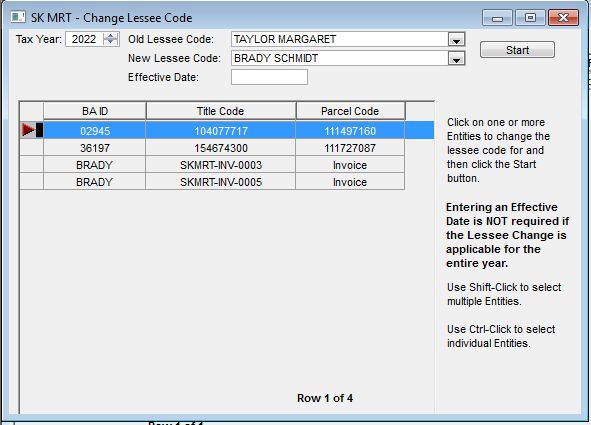
To use this tool:
- Choose your Tax Year
- Choose the Old Lessee Code, the lessee code to be changed, and the New Lessee Code, that the Old Lessee Code will be changed to
- If applicable, enter the effective date that this change occurs on. Make sure you hit the Tab key to confirm your data entry
- If the Effective date reads MON DD, YYYY, EDI Viewer has correctly read your effective date entry and will make changes as of that date:
- If the Effective date shows up as any other format, EDI Viewer has not acknowledged that you've entered a date. Hit your Tab key to enter the date:
- Highlight the row(s) that you'd like to change. You can use Shift+Click or Ctrl+Click to highlight multiple rows.
- Click the Start button. A window will pop-up to confirm the pending change:
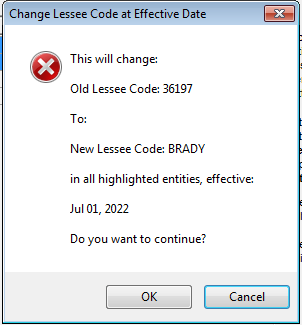
- Click the OK button to confirm and proceed with the change. Click Cancel if you do not want to make this change.

