 |
EDI Viewer - Delete Freehold Mineral Tax Invoice History
|
The Delete SK MRT Invoice window allows you to delete
old invoices from your database. These may be invoices for closed years
or invoices that are no longer needed for analysis.
Deleting an Invoice through this window does not delete BA Owners, Parcels, Titles or Cost Center master file data related to the deleted invoice.
BA Owners are deleted in the Owner / Lessee Maintenanace screen.
Parcels and Titles can be deleted using the 'Invoice Import' SK MRT Reports tab.
Cost Centers can be deleted in the Cost Center maintenance window.
If you delete any invoices, you can always import them again if you
need to review them again.
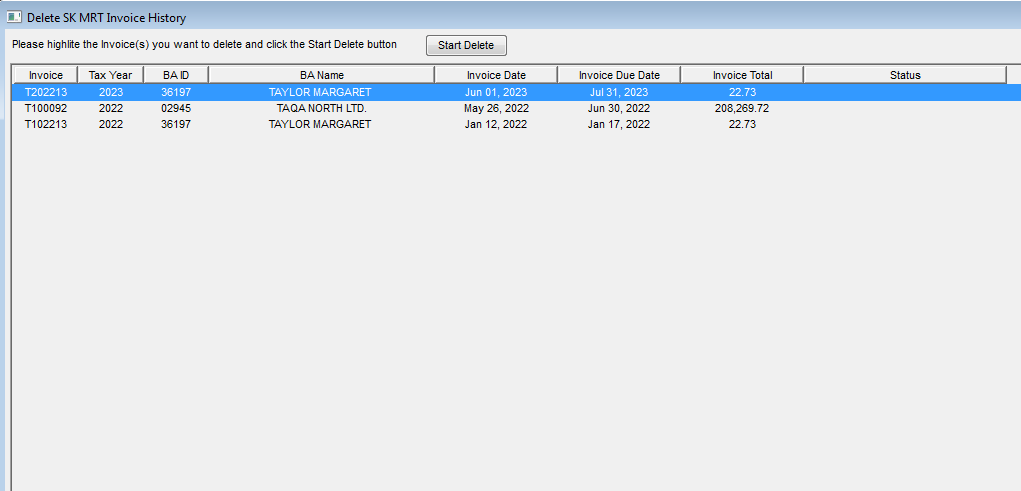
To delete invoices:
-
Click on the invoice or invoices you want to delete. To sort invoices
by Invoice Date, click on the Invoice Date heading button and then you
can see all invoices for a year together. To sort by other columns, click
on their heading button.
-
Verify the invoices you have highlited are correct. If you delete
an invoice by mistake, you can just import it again. Once you start the
delete process, it can only be stopped by rebooting your PC
-
Click the Start Delete button at the top of the window and all highlited
invoices will be deleted. This can take several minutes, depending on how
many and how large your invoices are.
-
The Status column will show you the different database tables the
invoice data is being deleted from. There are about 12 tables for each
invoice.