 |
EDI Viewer - Saskatchewan Mineral Rights Tax Title Maintenance
|
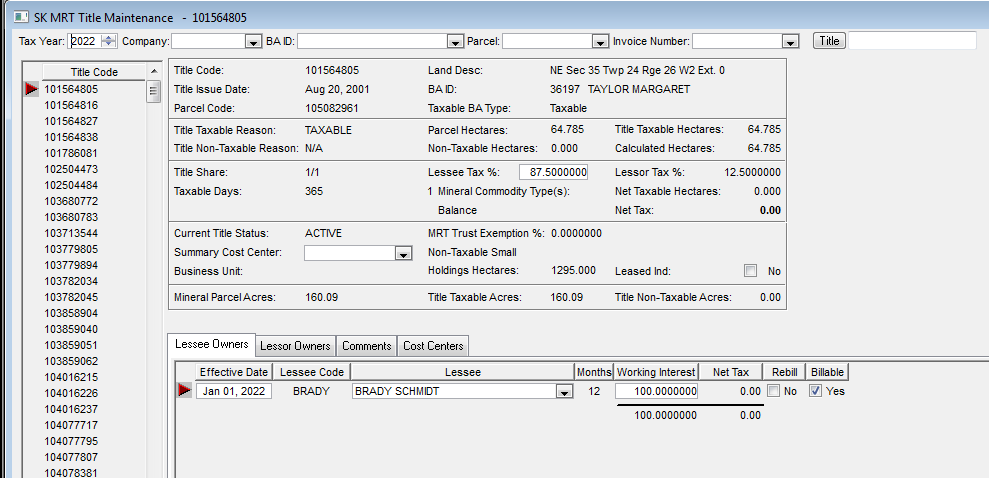
The Title Maintenance window is used to edit and update all title information such as lessee and lessor
information, lessee mineral tax percents, leased indicator, land system references, and misc. comments, etc.
This window is the key to how this SK MRT system works.
| |
Retrieving Titles:
- Entities can be retrieved by Tax Year, Company Code, BA ID, Invoice Number, Parcel, or a combination of all four. Simply choose a tax year and click the Retrieve button (left side of the Toolbar) or choose any combination of the drop-down parameters and click Retrieve.
- The Title Code box at the top right of this window is used to find a Title once you have already clicked the Retrieve toolbar button. When you have the titles listed on the left side of this window, the Find button will then scroll through these titles and find the Title Code you have asked for, if it exists.
|
| |
Editing Titles:
- Title Code Section
- Any data that can be editted can be tabbed to. Some data cannot be editted, like the Net Tax dollars.
- Lessee Tax % - Enter the percent that will invoiced to the lessees. The Lessor Tax % is the difference between the Lessee Tax % and 100. e.g. if the Lessee Tax % is 80% the Lessor Tax % will be 20%.
- The Net Tax $ amount is the amount that was imported from the SK MRT invoice files. A title that has been rolled forward will have 0.00 Net Tax until it is updated by importing an .xml Invoice Details file that contains the Title.
|
| |
To enter Lessee Owners, click on the tab Lessee Owners.
To enter Lessor Owners, click on the tab Lessor Owners.
To document comments at Title level, click on the tab Comments.
To view cost center data from the Cost Center Maintenance window without having to change screens, click on the tab Cost Centers. Cost Center updates are done in the Cost Center Maintenance screen.