 |
EDI Viewer - FCC Status Report
|
The Allowable Costs FCC Status Report is used to see the status of the
different AC forms and also has a batch processing function to print all
forms at once, create electronic files, or roll forward AC2's to the next
year..
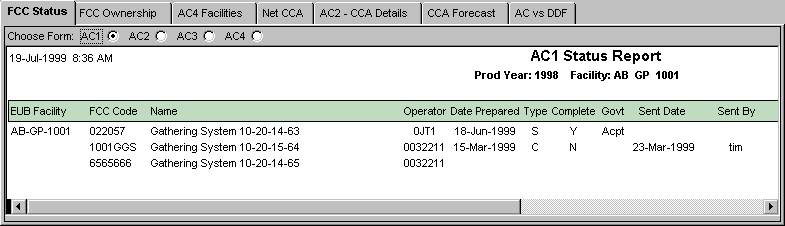
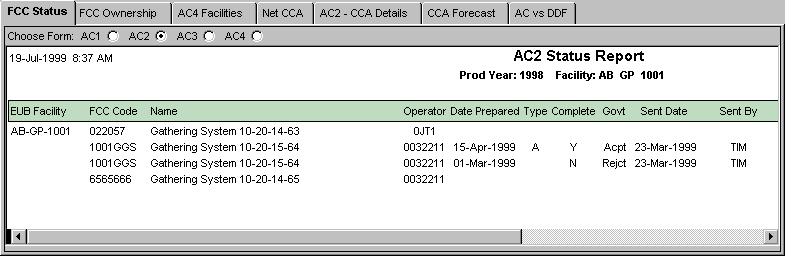
The Status Reports show for each form (AC1, AC2, AC3, AC4) by
FCC by reporting year this information:
-
has the form been created (the Date Prepared on the report is not blank)
-
has the form data entry been completed (the Complete flag set to Y)
-
has the form been sent to the gov't (Sent Date and Sent By are not blank)
-
has the form been sent / accepted / rejected by the gov't
-
what was the filename of the electronic file the form was sent in
-
what person is responsible for this FCC
AC1 Status Report
AC2 Status Report
AC Forms Batch Process
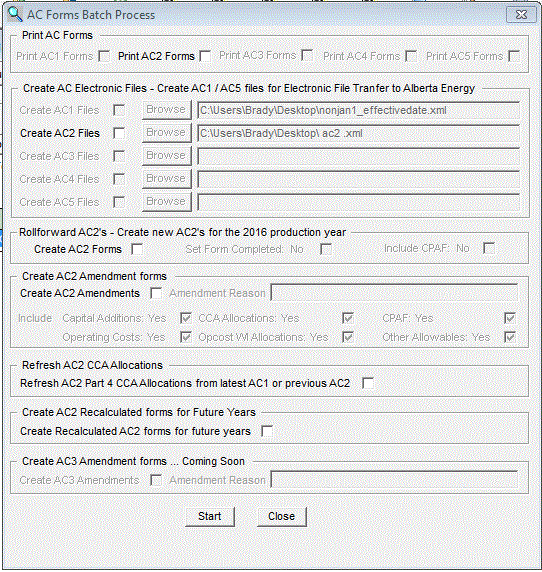
The AC Forms Batch Process window is opened from any AC Status
report by first highliting 1 or more rows on the Status report and then
clicking the right-mouse button. If you are on the AC2 Status report, then
AC2 options are available to you. In the above example of the window, you
could do one or all of the following:
-
Print AC2 Forms for all the rows you highlited on the AC2 Status report
-
Create an electronic AC2 File to send to the gov't for all the rows you
highlited on the AC2 Status report that have the Completed flag = Y
-
Create AC2's for the 1997 production year for all the rows you highlited
on the AC2 Status report that do not already have an AC2 form created for
1997.
Creating AC2's Batch Process:
-
Prior to creating new AC2's through the batch process, set up each FCC
on the Facility Cost Center Setup window
or create FCC's using the AC1 form.
-
If you enter FCC's through the Facility Cost
Center Setup window make sure the FCC Code, FCC Name, FCC Type, EUB
Facility, Operator, Effective Date, Remaining Useful Life, Contact
Person and Ownership are entered correctly.