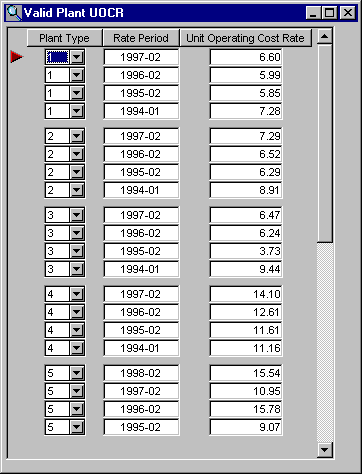
EDI Viewer - Valid Plant UOCR


The Valid Plant UOCR window is used to enter valid plant unit operating cost rates. If these rates are entered here, they are used on the Valid Facilities window when a plant type is chosen.
To add or insert a new row, do the following:
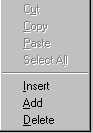
  • Right-click your mouse where you want to add the row to get a popup menu, and then choose add or insert.

Example:

  • To add a row, right click your mouse under the Plant Type heading.
    • Plant Type choices are 1, 2, 3, 4, and 5.
    • Rate Period displays as year-month, but a full date must be entered. To enter February 1, 1998 you enter 02/01/98. The date format (month/day/year, day/month/year, year/month/day) entered depends on the short date format of your computer. The short date format can be found from the Control Panel by clicking on Regional Settings and then the Date tab.

To delete a row, click on the row you want to delete and do the following:

  • Right-click your mouse to get a popup menu and choose delete. The row is removed from the screen but is not deleted until you scroll to another row or click the Save toolbar button.

Note: You will not be able to add or delete rows if you are in read only mode.

To Sort, click on the headings. To sort by Rate Period, click on the Rate Period heading and the data will be sort by Rate Period in ascending order. Clicking on the Rate Period heading again will sort the data in descending order. This can be done for any column by clicking on the heading.  
   
To Print, click the Print toolbar button or choose Print from the File menu.