 |
EDI
Viewer - Invoice Validation
|
The Crown Royalty Invoice Validation window is used to
validate any invoice against the validation master files. The
validation master files are created using the Valid Streams, Valid Facilities, and Valid Plant UOCR windows.

To validate an Invoice:
- choose the invoice number from the invoice list
at the top of the window.
- choose what you want to validate. Choices are:
- Facilities
- compares facility codes on the
invoice to facility codes on the
Valid Facilities window.
- Unit Operating Rate
- compares unit operating cost
rates by facility and production
period on the invoice to unit
operating cost rates on the Valid
Facilities window.
- Plant Types
- compares plant types for a
facility on the invoice to plant
type on the Valid Facilities
window.
- Transportation Regions
- compares transportation region by
facility on the invoice to
transportation region on the
Valid Facilities window.
- Streams
- compares stream id code on the
invoice to stream id code on the
Valid Streams window. If the
termination date on the Valid
Streams window is entered, checks
the invoice to make sure there
are no entries for that stream
after the termination date.
- Crown Interest
- compares crown interest percent
by stream and production period
on the invoice to crown interest
percent on the Valid Streams
window.
- Vintage
- compares vintage percent by
stream and production period on
the invoice to vintage percent on
the Valid Streams window.
- Processing / Reporting Facilities
- compares facility code on the
invoice to processing / reporting
facility codes on the Valid
Streams window to check that the
stream is linked to the proper
facilities on the invoice.
- Click the Start Validation button
- Check the Validation Results at the bottom of the
window to see if there where any errors or to see
a summary of what type of errors were found. The
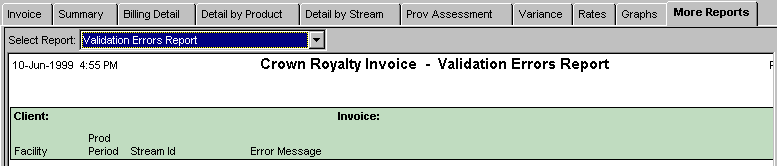
details of the Validation errors can be viewed
and printed form the Validation Errors Report on
the More Reports tab on the Crown Royalty Invoice
Report window.
|
|